
This guide will walk you through installation notes, troubleshooting tips, and special features for installing your VHEDIA head unit into a Toyota 70 Series 2009-2023.
Installation Video
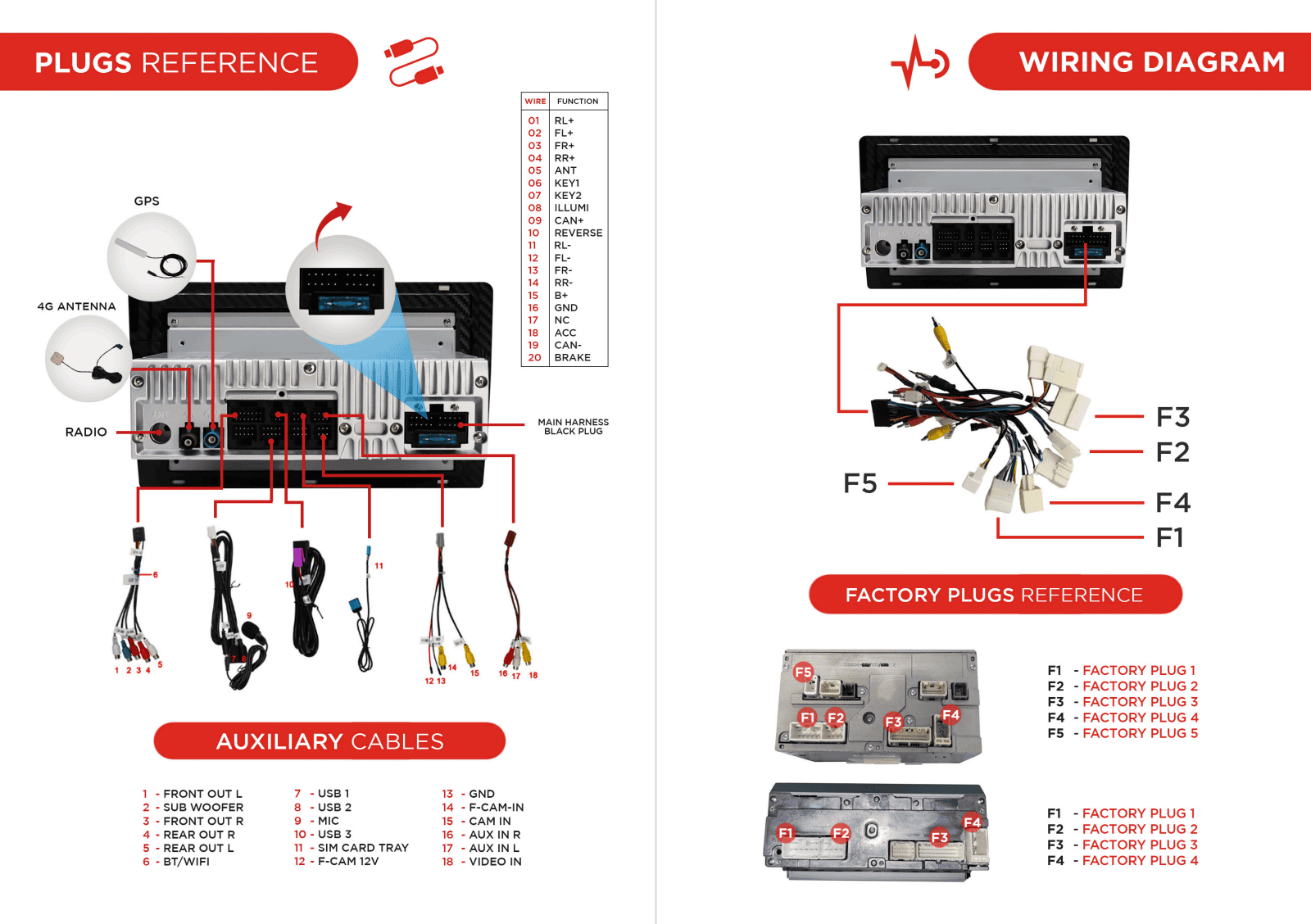
Which Wire Goes Where
Common Issues & Fixes
Vhedia Reverse Camera Not Working
We will need to check 2 things here:
When going to into reverse, is the screen changing but it is "No Signal" error?
If yes, you need to make sure the yellow RCA plugs are plugged together. The video guide will cover what you need to do.
When going to into reverse, nothing happens?
If yes, you need to check if the trigger wire is connected and also that the reverse camera is getting power.
Fix:
Connect the green trigger wire from the reverse camera RCA plug to the orange/black wire shown in the picture below:

Video Guide:
Reverse Camera Looks Strange or Has Some Lines
This seems to be a voltage issue. Please connect the negative of the reverse camera to chassis ground and not direct to reverse light negative.
Factory Reverse Camera Not Triggering
If your factory reverse camera is not triggering, follow these steps to resolve the issue.
1. Find the Correct Plug
Locate the Orange and Black Wires:
On the main harness, find the plug with orange and black wires. This is the key to receive feed from the reverse camera.

2. Prepare the Wires for Connection
Cut Off the 5-Pin Plug
Carefully cut off the 5-pin plug on the orange and black wires from the head unit’s main harness. Be sure to leave enough wire length to work with.
3. Identify the Car's Reverse Camera Trigger Wires
Find the reverse triggering plug in your vehicle

You also need to cut the wires connected to PIN 5, as it is also a male plug like the one on the main harness, so they cannot match.

4. Join the Wires
Tap or join the orange and black wires from the head unit’s harness to the corresponding wires on the car side. Since the plugs are the same gender and will not match, this step is necessary to establish the connection.
Ensure you securely connect the wires. You can use wire connectors or electrical tape to make a secure connection.
5. Test the Connection
Start Your Vehicle
Turn on your vehicle and shift into reverse gear.
Check the Head Unit Display
The reverse camera feed should appear on the head unit’s screen. If it does not, double-check the connections.
Troubleshoot if Necessary
Check the Connections
Ensure all plugs are securely connected and there are no loose wires.
Inspect for Damage
Look for any signs of damage on the wires or plugs that could be causing a faulty connection.
Head Unit Not Pushed In All The Way or Looks Flushed
You may just need to trim a little bit of the dash part off with a sharp blade. This will not effect the factory unit fitting back in and no changes externally once it's fitted back in.

Factory Antenna Not Going Up Anymore
If you still have the old round antenna style, what we need to do is give power to the antenna wire on the car side from our head unit.

Need further assistance? Reach us out on our support channels:
Live Chat on our website (https://vhedia.com.au/): Mon–Fri, 7 AM–5 PM (Perth time)
Phone Support: 1800 577 415, Mon–Fri, 7 AM–3 PM (Perth time)
Email: hey@vhedia.com.au