
This guide will walk you through installation notes, troubleshooting tips, and special features for installing your VHEDIA head unit into a Toyota Hilux 2011-2015.
Installation Video
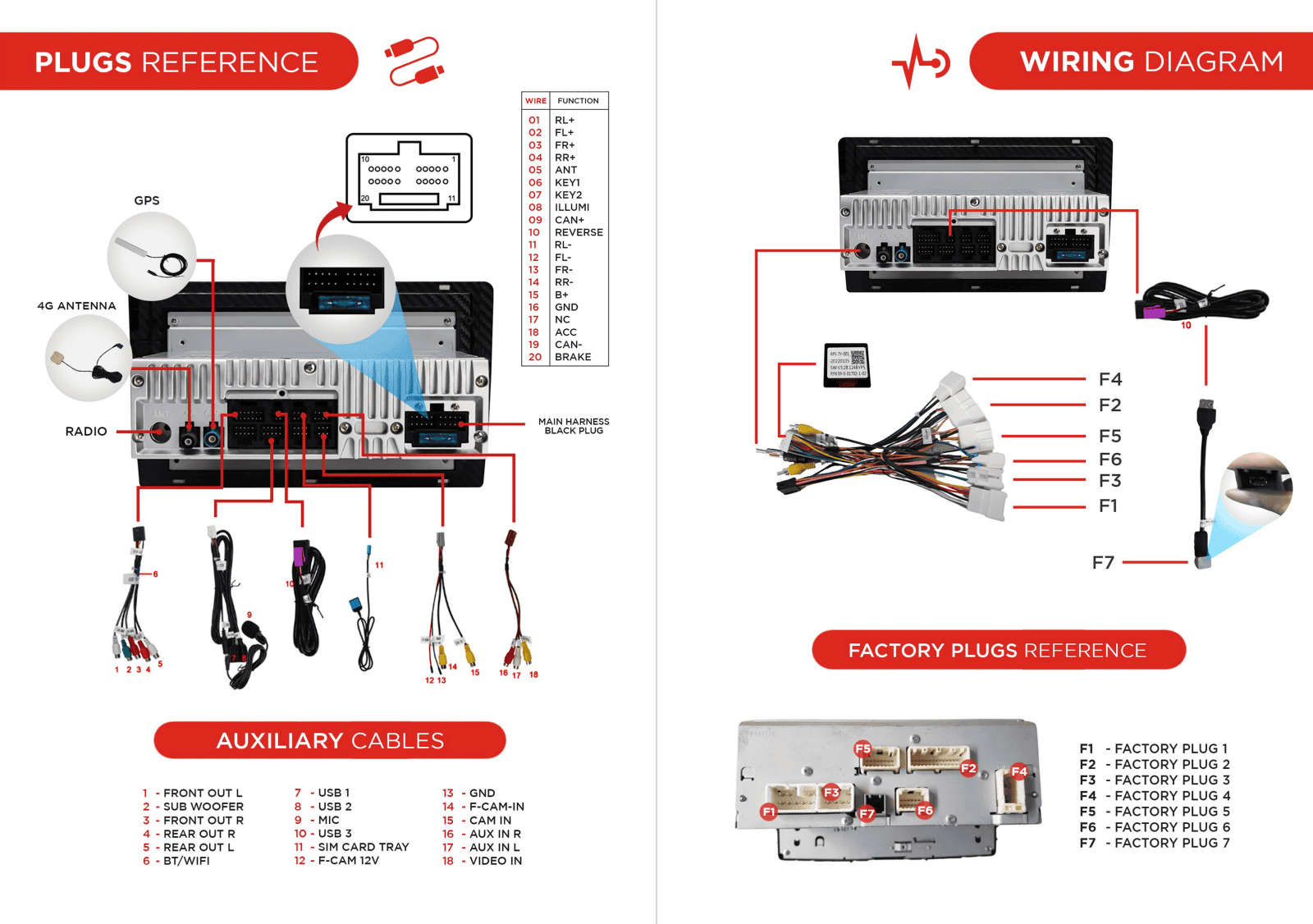
Which Wire Goes Where
Common Issues & Fixes
Glitchy Reverse Camera
Just make sure that the GND wire of the reverse camera is connected to Chassis GND instead of the reverse light negative wire.
Factory Camera Settings
Steering Wheel Controls Not Working
Make sure you set the correct CANBUS setting.
Go to Settings > Car Settings
Factory Settings and enter 126 for passcode
Go to CANBUS > CANBUS Settings
Select 2 TOYOTA/CAMRY/RAV4 (Simple) and hit OK
VIDEO GUIDE:
Go to Settings > Car Infotainment
Scroll to bottom and tap About Device
Tap the gear icon and enter 8878 for password
Go to CAN TYPE
Scroll and select 3. TOYOTA
Tap SAVE then OK to reboot and steering wheel controls should start working.
VIDEO GUIDE:
Flipped Previous/Next or Up/Down Buttons
A quick video guide below showing you how to fix the previous/next or up/down buttons if they are currently working the wrong way.
AM/FM Radio Issue
If you're experiencing radio issues and your factory radio antenna looks the same as below, you just need to turn on the EXT AMP setting from the head unit so the antenna will receive power. Please see reference picture and quick video guide below:
REFERENCE PICTURE:

VIDEO GUIDE:
Need further assistance? Reach us out on our support channels:
Live Chat on our website (https://vhedia.com.au/): Mon–Fri, 7 AM–5 PM (Perth time)
Phone Support: 1800 577 415, Mon–Fri, 7 AM–3 PM (Perth time)
Email: hey@vhedia.com.au