
This guide will walk you through installation notes, troubleshooting tips, and special features for installing your VHEDIA head unit into a Toyota LandCruiser 200 Series 2012-2015 (VX, GXL and Altitude).
Installation Video
Which Wire Goes Where
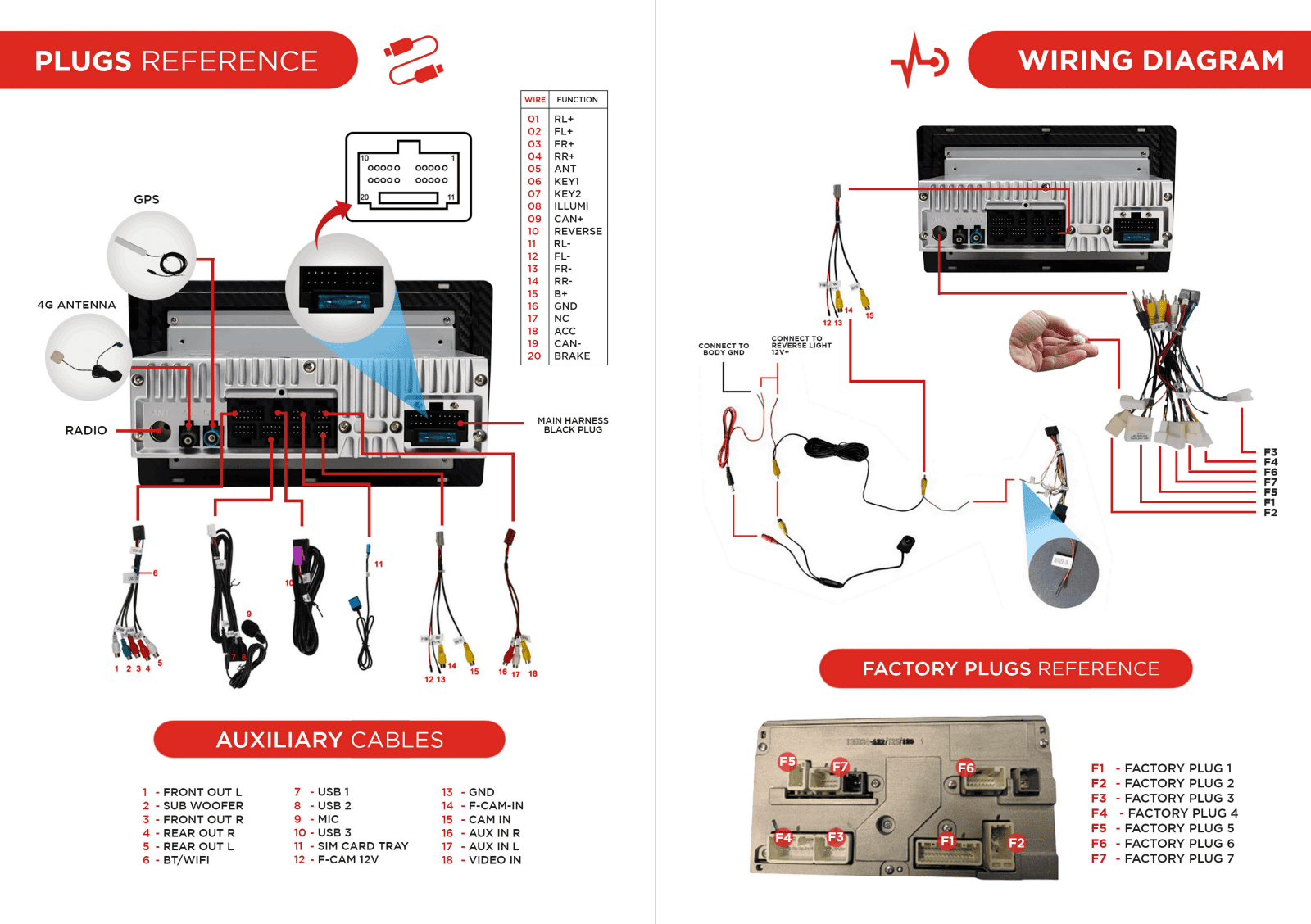
Common Issues & Fixes
Factory Reverse Camera Not Triggering
If the factory reverse camera is not triggering after installing your VHEDIA head unit in a Toyota LandCruiser 200 Series (VX, GXL, GX, and Altitude), follow the steps below to resolve the issue.
Check the 5-pin Plug (Factory Reverse Camera Trigger)
Locate the 5-pin plug on the head unit's main harness.
This plug contains orange and black wires and is responsible for the factory reverse camera trigger.
Ensure that this plug is properly and securely connected to the corresponding plug from the vehicle. A loose or incomplete connection can prevent the reverse camera from activating.
Refer to the photo below for visual guidance.

Verify the 4-pin Plug (Factory Reverse Camera Power Feed)
Locate the 4-pin plug on the head unit's main harness.
This plug connects to the factory plug from the vehicle to provide power to the factory reverse camera.
Ensure the 4-pin plug is securely connected to the vehicle's factory plug.
Refer to the installation video below for a detailed guide on locating and connecting this plug. (Starts at 8:40 seconds)
Factory Reverse Camera Not Showing
Verify if you have the 5-pin plug in our harness (has single orange and black wire on it) plugged into the 5-pin plug on your car side. This may have been on a patch cable that you can just remove on the car's factory harness. See reference picture:

Make sure that the 4-pin plug on your car side harness is plugged into our matching plug and then the yellow RCA plug from this is plugged into our purple wire with the CAM IN yellow RCA plug.
Confirm if that the harness that we have supplied has a little board plugged into the small plug in. This might just look like a little black heat shrink part. It is the small plug in the pink circle. It is missing in the image below:

Factory Camera Settings
Vhedia Reverse Camera Not Working
1. Put car into reverse and then open the app called F-CAM. Tap the icon on the side of screen so that the camera at rear of car is on. Do you see an image? If yes, then that means that there is video feed but no trigger. You just need to connect the little wire coming off the yellow RCA plug to our orange and black wire on our main harness you can just tap into this.
If here is no video feed at all, make sure that the yellow RCA from the camera is plugged into the purple Wire "CAM IN" with the grey 6 pin plug.
Double check if you have power at the camera end.
Check Engine Light Issue
If you ever get a check engine light on after installing the head unit, please disconnect the wires shown on the image below. The error will be a speed sensor wire and once these wires have been cut, you should not have any issues and light will clear itself and cruise control will work again.

Radio Reception Issue

In your cable kit, you will see two blue wires with black plugs and labeled "AMP CON".
Simply swap those two plugs around and that should fix the radio reception issue.
Patch Cable Guide | What to Keep & What to Remove
If you're installing a Vhedia head unit into a LandCruiser 200 Series, you’ll often find several Toyota patch cables behind the factory unit. These can cause issues if they’re left connected — especially with the MT-1855 style plug variations.
What You’ll Learn:
How to identify a Toyota patch cable (foam-wrapped or multi-join blocks)
Why most patch cables need to be removed
What happens if they’re left connected
The one patch cable related to the antenna amp (and when you keep it)
Clearing space behind the dash for an easier install
Why This Matters:
If you're experiencing no radio, sound issues, or reverse camera issues — removing the Toyota patch cables is almost always the fix.
Video Guide:
Need further assistance? Reach us out on our support channels:
Live Chat on our website (https://vhedia.com.au/): Mon–Fri, 7 AM–5 PM (Perth time)
Phone Support: 1800 577 415, Mon–Fri, 7 AM–3 PM (Perth time)
Email: hey@vhedia.com.au