
This guide will walk you through installation notes, troubleshooting tips, and special features for installing your VHEDIA head unit into a Volkswagen Amarok 2016-2022.
Installation Video
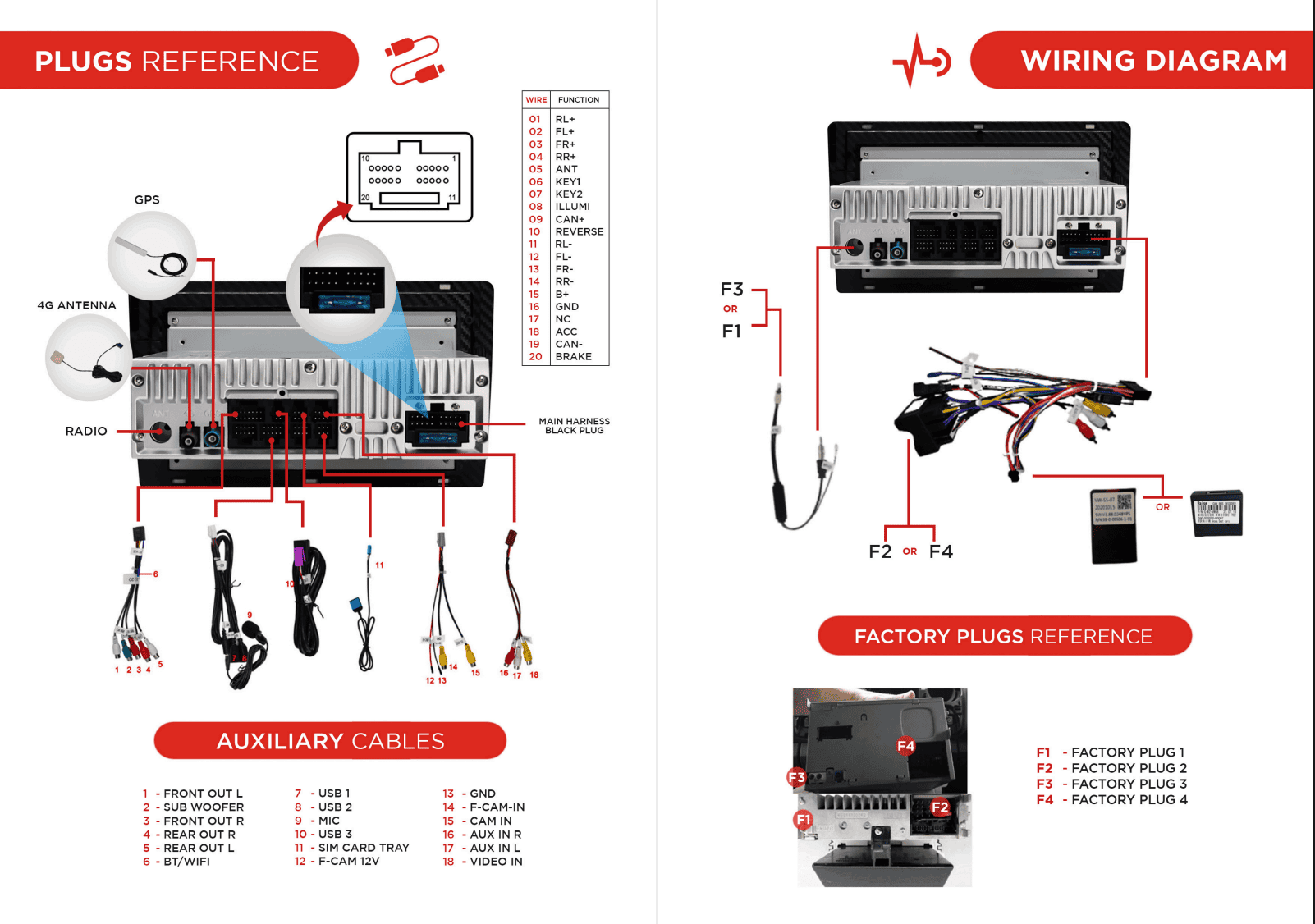
Which Wire Goes Where
Common Issues & Fixes
Head Unit Not Turning On
Make sure that the cable kit with the CANBUS decoder is plugged in properly to the back of head unit.
If that doesn't work, remove/disconnect the CANBUS decoder from the original cable kit and connect it to the other cable kit that's included on the head unit kit.
Now plugged in the other cable kit (which now have CANBUS decoder) to the back of the head unit and see if it is turning on now.
Reference picture of the CANBUS decoder:
Head Unit Shows Random Open Bonnet Notification and Parking Sensor Issues
Most factory features issues can be fixed by setting the CANBUS correctly.
Go to Settings > Car Settings > Factory Settings > Enter passcode 126 > CANBUS > CANBox Settings > Select 7:VW (Simple,Raise) > Hit OK
Go to Settings > Car Infotainment > About Device > Tap the gear icon in the top right corner of the screen > Enter passcode 8878 > CAN Type > Choose 240 > Hit Save and OK to reboot
Go to Settings > Car Infotainment > About Device > Tap the gear icon in the top right corner of the screen > Enter passcode 8878 > CAN Type > Choose 1 or 2 > Hit Save and OK to reboot
Factory Camera Settings
Factory Camera – Static Display
If the camera works but the screen shows static:
Go to Settings > Car Infotainment > About Device > Fill in password 8878 > Backcar Setup.
Cam Type, select (0 CVBS) > CamFormat, select (1: NTSC or 2: PAL) choose the one based on what your factory camera uses but majority uses NTSC.
Tap SAVE > OK to reboot.
Your reverse camera should start working after the reboot.
Static and Glitchy Vhedia Aftermarket Reverse Camera After Install
Please install the cam filter included on the kit.

Dual Fakra Adapter
See on how to wire the Dual Fakra Adapter on your Vhedia head unit.
Wiring Instructions

Need further assistance? Reach us out on our support channels:
Live Chat on our website (https://vhedia.com.au/): Mon–Fri, 7 AM–5 PM (Perth time)
Phone Support: 1800 577 415, Mon–Fri, 7 AM–3 PM (Perth time)
Email: hey@vhedia.com.au